
Workflow Master
- Curated knowledge for model recommendations and node selection.
- Builds, edits, explains, and debugs workflows
- Runs generations with your permission
Describe what you want right inside ComfyUI. It plans, builds and runs workflows. Editing the canvas while you work, it crafts side by side with you.
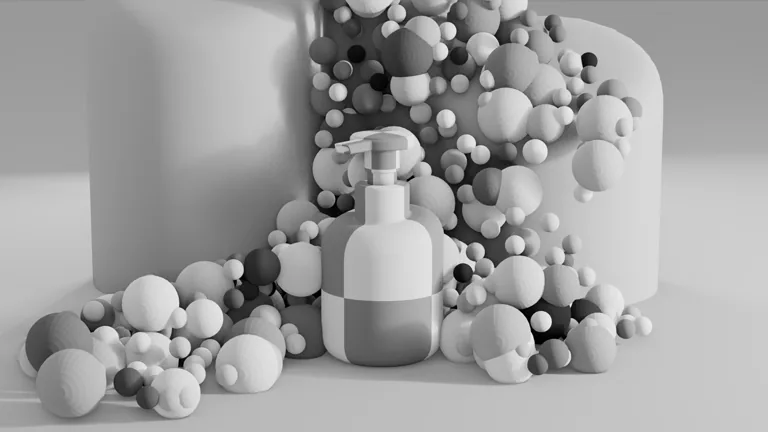



Create 3 product scenes from the base composition and bottle references.



Use the motion reference and keyframe to render a video ad.

 User
User

The agent

Use cases
Studios run these workflows in production today, on Comfy.
By 852話 | Andidea
Bring characters and imagined worlds into the same creative workflow. The agent helps shape the look, explore a scene, and compare generation results. Made by one artist in 100 hours with Comfy Agent.
Animation
By Doug Hogan
Take a shot from image to compositing passes. Isolate the subject, generate masks, and work with depth and normals in one workflow.
VFX
By shanef3d
Build a product scene with precision in Blender. Explore rendering, lighting, materials, and composition, then refine the details on the canvas.
Marketing
Everywhere else, you get the output file. With ComfyUI, Comfy Agent hands you the pipeline that made it: every node, seed, sampler, and model. Reuse it at any time.
Try on Comfy Cloud to get free tokens. No setup needed. The agent is there when you log in. You can start with all your saved workflows and assets.
No account yet? Sign up for free
Agent on local ComfyUI is coming soon. Your GPU, your models, your custom nodes. The agent walks you through setup, picks models that fit your hardware, customizes your environment, and vibe codes all the tools you need.
| Feature | Comfy Agent | Comfy MCP |
|---|---|---|
| What is it | The agent built into the Comfy app. Chat and build on the canvas together. Curated knowledge and native tools to operate ComfyUI. | Your own agent, connected to ComfyUI. |
| Best for | Both beginners to advanced builders. See the agent build and edit workflows real time Ask about existing workflows | People who already work in another agent. |
| Requires | Ready-to-go agent integration. Try for free. Uses your existing Comfy Credits. | Your own agent. Comfy Cloud or a local ComfyUI setup. |
| Runs on | Comfy Cloud GPUs now; local GPUs coming soon | Comfy Cloud GPUs, or your local GPU |
| Custom nodes | Cloud-supported nodes on Cloud. Any local node when local support launches. | Cloud-supported on Cloud. Any node on local. |


Key capabilities: - Builds, edits, reads, runs, and debugs workflows, running a task end to end - Builds in real time while you keep editing the graph - Curated knowledge for model recommendations and parameter tips - References assets and nodes, dragged straight from the asset library - Visual understanding of assets anywhere in Comfy - Creates, saves, and deletes skills - Up to 5 agent chats in parallel, with full chat history Coming soon: - Local support, including creating custom nodes and model/node downloads - GPU detection and workflow recommendations - LLM model selection
Frontier models by Anthropic. We always provide the strongest we can offer for the job. Choices for switching LLMs is on the way. What they lack alone, the agent adds: full context of your workflow, your errors, and Comfy itself.
Yes. We have local LLM support in the roadmap. ComfyUI can do the memory management for both the image / video models and the LLMs at the same time.
Yes. Open any workflow and the agent reads the whole graph. Describe what you want to change, or point at an error, and keep editing together. You can also reference another workflow in the chat.
You decide. By default the agent will ask your confirmation to run any generations. In auto mode it runs and iterates on its own until the result is ready.
Today, we provide some free tokens for new users to try the chat. Normally, Comfy Agent consumes the Comfy Credits for LLM tokens. Your existing credits can apply to it already. See the pricing page for plans and usage details.See pricing
Local support is coming soon. The same agent will run in your local ComfyUI, working on workflows based on your GPU, your models, and your custom nodes. It will walk you through setup, pick models that fit your hardware, and build the tools you need.
No. The canvas stays at the center. The agent builds with you on it, every control stays where it is, and you keep the editable workflow behind every result.
ChatGPT only gives you instructions to follow. Comfy Agent works directly on your canvas. It sees your workflow and your errors, answers your questions, and also builds and runs the graph, and reviews the output. It doesn’t just see the entire setup, but also execute tasks for you.
Over every model, every node, every step, every output.